How to Choose a CTR Campaign Tool: CTR Sprout Alternative Checklist
You are comparing CTR campaign tools and need proof that visits actually happened. Many platforms show click counts but no screenshots, no keyword positions, and no control over how long each visit lasts. That gap makes it hard to judge whether a tool earns its credits.
This article turns that problem into a checklist covering campaign types, platforms, screenshot proof, targeting, and cost control. You will see how CTRTool measures against each criterion, what its credit model actually costs, and who should use it, so you can decide whether it is the right CTR Sprout alternative for your campaigns.
What Is CTRTool? The CTR Campaign Tool Behind the Checklist
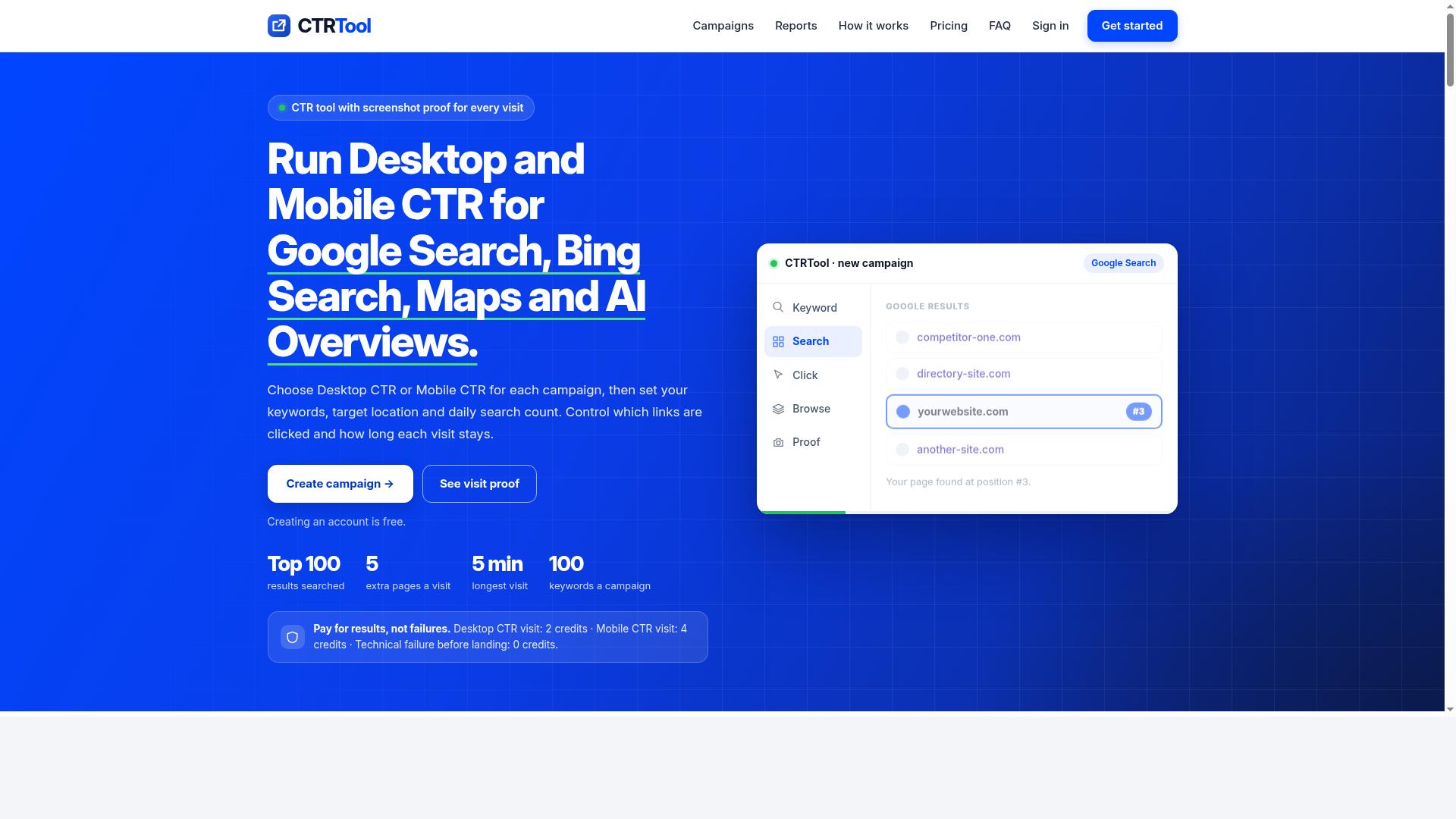
CTRTool is a SaaS platform that runs click-through rate campaigns for Google Search, Bing Search, Google Maps, and AI Overviews, providing screenshot proof for every visit. It is built for teams that want to influence how often a page or listing earns a click in search results, a practice many SEO practitioners group under click-through rate optimization.
The platform handles the operational side of a campaign: choosing Desktop or Mobile traffic, setting keywords, targeting locations, and controlling which links get clicked and how long each visit lasts. Every visit is documented, so campaign activity can be reviewed rather than taken on faith.
The site is upfront about limits. It states plainly that automated visits do not guarantee rankings, which is an important framing detail for anyone weighing a CTR Sprout alternative. The checklist that follows exists to help you judge CTRTool, and any similar tool, against the criteria that actually matter.
Campaign types, platforms and who it serves
CTRTool offers four distinct campaign types: Google Search CTR, Bing Search CTR, Google Maps CTR, and AI Overview CTR, each with specific targeting options. The table below summarizes what each one does, based on the platform's published details.
| Campaign type | What it does | Notable options |
|---|---|---|
| Google Search CTR | Searches a keyword and clicks the organic result | Desktop or Mobile, Top 100 results, internal pages |
| Bing Search CTR | Same search-and-click flow, on Bing | Desktop or Mobile, Top 100 results |
| Google Maps CTR | Finds a business listing and clicks its website link | Up to 50 listings, city targeting |
| AI Overview CTR | Finds your site in the overview and clicks its source link | Source links, citation order, requires matching content |
Setup is shared across campaign types. Each campaign supports up to 100 keywords, country, state, and city targeting (or Any country), and a search depth up to 100. Users also set daily search counts with now, spread out, or gap timing, along with days, hours, and a time zone. Daily goals reset at 00:00 UTC.
Visit behavior is configurable too. You define the target URL, internal page URLs, and link text, then control click order, scrolling time, up to five additional pages per visit, and visits of up to five minutes total. Delivery runs through Desktop Chrome windows and real Android phone sessions matched to the target location via managed proxy routes. Reports show full visit paths, search and website screenshots, and keyword positions over time, including Search positions, Maps listing order, and AI citation order.
The audience is straightforward: SEO practitioners and agencies running campaigns for their own sites or client websites. The per-campaign device choice, geo-targeting down to city level, and screenshot-backed reporting fit teams that need to document campaign activity. Custom form filling or other custom actions are available through support with a separate agreed one-time fee.
Does CTRTool Meet the CTR Campaign Tool Checklist?
To determine if CTRTool is a viable CTR Sprout alternative, we evaluate it against a checklist covering platforms, proof, targeting, and cost control. This framework reflects what an SEO expert actually needs from campaign management software: reach across the search surfaces that matter, verifiable evidence that visits happened, precise targeting, and predictable spending.
Each criterion is assessed using publicly available information about CTRTool's features and pricing. The goal is a clear tool selection checklist you can apply to any candidate, not just this one.
The short answer is yes. CTRTool meets all four criteria, and in the proof category it goes further than most options in this space by documenting every visit with screenshots. The sections below break down exactly how.
Checklist criteria: platforms, proof, targeting and cost control
The checklist evaluates CTRTool on four core criteria: platform coverage, proof of visits, targeting capabilities, and cost control mechanisms.
Platform coverage. CTRTool runs campaigns on Google Search, Bing Search, Google Maps, and AI Overviews. That spread matters because click-through rate behavior differs across each surface, and a tool limited to one engine leaves gaps in your CTR tracking.
Proof of visits. This is CTRTool's strongest differentiator. Every visit comes with screenshot proof, with search screenshots and landing screenshots delivered as separate proof images. Full visit paths are also included, so you can see how a session moved through the site rather than trusting a bare click count.
Targeting capabilities. Campaigns can be set to Desktop or Mobile, targeted by country, state, or city, and paired with keyword position tracking over time. That tracking includes Maps listing order and AI citation order, giving you SERP tracking and rank monitoring beyond the classic blue links.
Cost control. Pricing is credit-based with monthly plans: Starter at $59 for 2,000 credits and Growth at $125 for 5,000 credits. The model is pay-for-results: no credits are charged for technical failures before landing, and visits that cannot verify the requested location use no credits. One credit balance is shared across all campaign types, websites, and keywords, and unused credits roll over while you stay subscribed.
On each criterion, CTRTool holds up. Platform reach is broad, proof is unusually granular, targeting covers device, geography, and rank position, and the billing structure protects your budget from wasted spend. For a CTR Sprout alternative comparison, that combination makes CTRTool a strong candidate on the checklist.
Key Features That Separate CTRTool From Other CTR Tools
CTRTool distinguishes itself through features like screenshot proof, detailed visit paths, and keyword position tracking across multiple platforms. These are not cosmetic extras. They address the core problem of any click-through rate campaign: proving that a visit actually happened as promised.
That proof matters when you are weighing a CTR Sprout alternative against other options. A tool selection checklist should test whether a platform can document each visit and show how rankings move over time.
The sections below cover the specific features that set CTRTool apart: screenshot proof, visit paths, keyword position tracking, and per-campaign controls.
Screenshot proof, visit paths and keyword position tracking
Every CTRTool visit is documented with search and landing screenshots, providing verifiable proof of each click. The two images are stored as separate proof images, so you can confirm both the search result that was clicked and the page that loaded afterward.
CTRTool also records full visit paths. Each report shows the journey from the original search through to the landing page, including up to five additional internal pages per visit. Visits can run up to five minutes in total, which gives the session enough time to resemble genuine browsing rather than a single bounce.
Keyword positions are tracked over time across several surfaces:
- Search positions for the target keyword
- Maps listing order for local campaigns
- AI citation order for AI Overview campaigns
For an SEO expert, this turns CTR tracking into something measurable. You can compare rank movement before and after a campaign, check whether a Maps listing climbs in order, and see whether a site earns a citation position in AI Overviews. That evidence supports ROI measurement far better than a raw visit count, and it gives you a defensible record when reporting to clients.
The pay-for-results credit model reinforces this. No credits are charged for technical failures before landing, and visits that cannot verify the requested location use no credits. Combined with the screenshots, the reporting closes the loop between what was ordered and what was delivered.
Desktop vs Mobile campaigns and per-campaign controls
CTRTool lets users choose Desktop CTR or Mobile CTR for each campaign, with separate credit costs and targeting options. Desktop visits cost 2 credits each, while Mobile visits cost 4 credits each. That distinction matters because mobile and desktop traffic behave differently, and a campaign should match the device your audience actually uses.
Each campaign also carries its own targeting and scheduling settings:
- Location targeting: country, state, or city, or "Any country"
- Keywords: up to 100 per campaign, with up to 100 campaigns total
- Search depth: up to 100 results
- Timing: daily search counts with now, spread out, or gap timing, plus days, hours, and time zone (daily goals reset at 00:00 UTC)
- Visit setup: target URL, internal page URLs, link text, click order, and scrolling time
These controls support different goals. A local business chasing map visibility can run city-targeted Mobile campaigns, while a B2B team working on competitive keywords may prefer Desktop visits. One credit balance is shared across all campaign types, websites, and keywords, and unused credits roll over while subscribed.
Campaigns can be paused or adjusted as needs change. If a keyword starts ranking well or a location underperforms, you can shift focus without starting over. That flexibility is a strong point in any competitor comparison, since device targeting and geo-targeting are exactly where generic tools tend to fall short.
Pricing and Plans: What the Credit Model Actually Costs
CTRTool uses a credit-based pricing model with monthly plans: Starter at $59 for 2,000 credits and Growth at $125 for 5,000 credits. That structure is worth understanding before you commit, because the sticker price and the real cost per visit are two different numbers.
The credit system is the core of any honest pricing analysis for a CTR campaign tool. Credits are consumed per visit, and the rate depends on the device type you target. That means your effective budget depends on how you split a campaign between desktop and mobile traffic.
| Plan | Monthly Price | Credits | Desktop Visits | Mobile Visits |
|---|---|---|---|---|
| Starter | $59 | 2,000 | Up to 1,000 | Up to 500 |
| Growth (Recommended) | $125 | 5,000 | Up to 2,500 | Up to 1,250 |
| Scale | $399 | 20,000 | Up to 10,000 | Up to 5,000 |
| Agency | $699 | 40,000 | Up to 20,000 | Up to 10,000 |
Two cost rules matter most. A Desktop CTR visit costs 2 credits, while a Mobile CTR visit costs 4 credits. A verified search that does not produce a match costs 1 credit, and a technical failure before landing costs 0 credits.
That last point is a genuine fairness signal for your tool selection checklist. You are not charged for a visit that never lands, and partial attempts are billed at a lower rate rather than the full visit cost.
Unused credits roll over while your subscription stays active, but they expire when a cancellation takes effect. For campaign scheduling, that favors steady monthly usage over sporadic bursts.
Creating an account is free, so you can explore the interface before paying. Custom development is billed separately as an agreed one-time fee, which keeps that work outside the credit pool.
One timing detail deserves attention. The site shows limited launch pricing with a note that prices rise 30% on November 15, so locking in a plan early has a clear cost benefit for a long-term campaign.
To estimate real cost, divide your monthly budget by the credit cost of your target device mix. A desktop-heavy campaign stretches further per dollar than a mobile-heavy one, which is why device targeting decisions belong in your budget planning, not just your strategy.
For ROI measurement, compare the monthly outlay against the value of improved click-through rate and the organic positions those visits support. The per-visit cost is best judged across a full campaign cycle rather than a single month.
On pay-for-results billing, the zero-credit rule for technical failures is the closest thing to a results-aligned safeguard here. The model rewards reliable delivery, which is exactly what you want from campaign management software.
The verdict is straightforward: the credit model is transparent, predictable, and priced to scale from a solo SEO expert up to an agency running large CTR tracking programs. Map your device mix first, then pick the plan that matches it.
Trust Signals: Proof, Transparency and Pay-for-Results Billing
CTRTool builds trust through verifiable screenshot proof, transparent visit paths, and a pay-for-results billing model that charges only for completed visits. For agencies and SEO experts evaluating a CTR campaign tool, these are the signals that separate a serious platform from a risky one.
When you compare a CTR Sprout alternative, trust should sit near the top of your tool selection checklist. A platform that can show its work, explain its billing, and filter bad traffic gives you something concrete to stand behind with clients.
Screenshot proof is the clearest of these signals. CTRTool captures search and landing screenshots as separate proof images for every visit, so you can confirm what actually happened rather than taking a report at face value.
That matters for campaign management software used on behalf of clients. Screenshots turn a claim into evidence you can review and share during reporting.
Full visit paths add the next layer. Each visit can show the user journey, including up to 5 additional internal pages beyond the landing page, with visits lasting up to 5 minutes.
This supports conversion tracking and ROI measurement conversations. You can see how a session unfolded instead of judging a campaign on a single data point.
Keyword position tracking over time provides ongoing transparency. CTRTool tracks keyword positions, including Maps listing order and AI citation order, so rank monitoring covers more than the classic blue links.
For SERP tracking and competitor comparison work, that history helps you spot movement and explain it clearly. It is the kind of visibility an SEO expert needs to defend a strategy.
The pay-for-results credit model reduces risk in a way many tools do not. Credits are consumed only when a visit is successfully completed, and no credits are charged for technical failures before landing.
Visits that cannot verify the requested location use no credits either, which supports geo-targeting accuracy. Unused credits roll over while you are subscribed, and one credit balance is shared across all campaign types, websites and keywords.
That shared balance simplifies pricing analysis during tool selection. You are not juggling separate pools or writing off spend on failed visits.
Combined with proof screenshots and visit paths, the reporting gives agencies a reporting dashboard story built on verified data. Clients see verified sessions, not inflated numbers.
Transparency extends to the legal side. CTRTool publishes a legal notices page and terms of use, so you can review the rules before committing budget or onboarding a client.
For team collaboration, that documented foundation matters. Roles, responsibilities and client expectations rest on clear terms rather than assumptions.
Put together, these signals build confidence for agencies and SEO experts. Screenshot proof, full visit paths, keyword position history, and pay-for-results billing form a feature evaluation checklist you can apply directly.
On the trust dimension, CTRTool is a legitimate, transparent choice for a CTR Sprout alternative. The platform shows its evidence and explains its charges, which is exactly what a careful buyer should demand.
Who Should Use CTRTool
CTRTool is designed for SEO practitioners and agencies running CTR campaigns for their own or client websites across Google Search, Bing Search, Google Maps, and AI Overviews. That focus shapes exactly who gets the most value from it, and who may be better served by a different kind of campaign management software.
The platform speaks to people who already understand click-through rate as a ranking and visibility lever, not as a vanity metric. If your work involves shaping how a page appears in results and measuring what happens next, you are in the right audience.
SEO professionals form the core user group. These are practitioners who manage keyword-level visibility and want to influence how often a listing earns a click. Typical use cases include:
- Boosting CTR for competitive keywords where organic positions are hard to shift
- Testing how different titles and descriptions affect click behavior
- Improving local SEO visibility through Google Maps campaigns
- Optimizing how pages surface in AI Overviews
Each of these tasks requires steady CTR tracking and the ability to compare results over time, which is where a dedicated CTR campaign tool earns its place in the workflow.
Digital marketing agencies are the second major audience. Agencies juggle multiple client properties at once, so campaign organization and clear client-facing output matter as much as the campaign mechanics themselves.
That combination supports the reporting dashboard and client communication side of agency work, not just the campaign build.
Freelancers sit comfortably in the same audience. A solo SEO expert managing a handful of sites gains the same keyword-level control without needing a large in-house team to operate it.
The site's own guidance mentions using tier links, PBNs, and test properties, which signals the intended user is comfortable with advanced link and testing structures. Readers new to these concepts should expect a learning curve before campaigns deliver meaningful insight.
Not everyone benefits. Practitioners with very low budgets may find a paid CTR campaign tool hard to justify against the cost of the campaigns themselves. Likewise, anyone whose campaigns sit outside the supported platforms, Google Search, Bing Search, Google Maps, and AI Overviews, will not be able to apply the tool to their traffic sources.
If your priority is broad multi-channel advertising rather than search visibility, this is likely the wrong category of software. For search-focused SEO work, though, the fit is clear and deliberate.
Final Verdict: Is CTRTool the Right CTR Sprout Alternative for You?
CTRTool stands out as a strong CTR Sprout alternative with its screenshot proof, multi-platform support, and transparent credit-based pricing. If your tool selection checklist prioritizes verifiable evidence, broad campaign coverage, and clear costs, this platform meets those criteria on paper.
The summary below compares the two tools on the points that matter most in a competitor comparison. Keep in mind that details can change, so confirm current specifics before committing.
| Aspect | CTRTool | CTR Sprout |
|---|---|---|
| Proof of activity | Screenshot proof of campaign activity | Confirm current proof method directly |
| Platform coverage | Multi-platform campaign support | Verify supported platforms on their site |
| Pricing model | Transparent credit-based pricing | Check current plans and terms |
The screenshot proof is the standout differentiator. For an SEO expert running click-through rate campaigns, evidence of what was delivered supports better ROI measurement and CTR tracking than a claim alone.
Credit-based pricing also fits the checklist's pricing analysis step. You pay for what you use, which keeps costs aligned with campaign scope rather than fixed subscription tiers.
Choose CTRTool if your priorities are verifiable proof, multi-platform campaigns, and transparent costs. It suits teams running structured ad campaign optimization and rank monitoring alongside CTR campaigns.
Consider other options only in narrow cases. If your budget is extremely tight, a free tier elsewhere may be tempting. If you need a specific capability outside CTRTool's scope, confirm it exists before switching.
For further inquiries, contact support at vaibhav@autoblogging.ai or visit https://ctrtool.com. The site also lists Sign in, Create an account, Support, Terms of use, and Legal notices pages for reference.
Frequently Asked Questions
What should a CTR campaign tool actually prove for every visit?
A trustworthy CTR tool should show verifiable evidence that each visit happened, not just report a number. CTRTool provides screenshot proof for every visit, with search and landing screenshots as separate proof images, plus full visit paths so you can review exactly what occurred.
Which platforms and devices can I run campaigns on with CTRTool?
CTRTool runs Desktop and Mobile CTR campaigns for Google Search, Bing Search, Maps and AI Overviews. You choose Desktop CTR or Mobile CTR per campaign, set your keywords and target location, and can target a country with an optional state and city, or select "Any country."
How does CTRTool's credit-based pricing compare to flat monthly subscriptions?
CTRTool uses monthly plans priced in USD with pay-for-results credits: Starter is $59/month for 2,000 credits (up to 1,000 Desktop CTR visits or 500 Mobile CTR visits), and Growth is $125/month for 5,000 credits (up to 2,500 Desktop or 1,250 Mobile visits). When comparing alternatives, check whether a competitor charges for attempts or only for completed visits, and confirm what proof you receive per visit.
What eligibility rules should I check before choosing a tool?
Make sure the tool can actually reach your target pages under its own rules. With CTRTool, the page must appear within the top 100 organic results for the chosen keyword and location, Maps campaigns check up to 50 listings (about five pages), and AI Overview campaigns need a matching source link.
Can I track keyword positions over time, including Maps and AI Overviews?
Position tracking is a key checklist item because rankings shift and campaigns depend on them. CTRTool tracks keyword positions over time, including Maps listing order and AI citation order, so you can see how visibility changes alongside your campaign activity.
Who is CTRTool built for, and how do I get support?
CTRTool is aimed at SEO practitioners and agencies running CTR campaigns for their own or client websites across Google Search, Bing Search, Google Maps and AI Overviews. It is a global online service with no stated country restrictions, and support is available by email at vaibhav@autoblogging.ai.